快速开始
MassFlow 是一个面向质谱成像(MSI)与质谱(MS)数据的模块化计算框架,提供高效的数据读取、预处理和管理功能。
作者:董乐强 , 董京伟
问题反馈: 如果在使用 MassFlow 或阅读文档时发现问题,可通过 GitHub Issues 提交反馈,或联系邮箱:707244007@qq.com。
概述
质谱成像数据通常包含大量像素和质谱信息。直接处理这些数据时,可能会受到背景信号、噪声、峰位置偏移以及低质量峰等因素影响。
MassFlow 将常用的 MSI 预处理步骤整合到同一套流程中。使用者只需要提供数据文件,并选择需要执行的处理步骤,即可生成新的 MSI 数据。
它适合:
- 希望对 imZML 数据进行预处理的 MSI、代谢组学和质谱研究人员;
- 希望进行峰提取、峰对齐、同位素过滤、加合物过滤或统计过滤的用户;
- 希望进一步查看离子图或进行 UMAP/KMeans 组织区域划分的用户。
MassFlow具有的功能
- 读取 MSI 数据 —— 直接读取
.imzML和.ibd文件,并用于后续处理。 - 基线校正 —— 去除随 m/z 缓慢变化的背景信号。
- 噪声抑制 —— 减少谱线中的随机波动,使真实峰更加清晰。
- 强度归一化 —— 减少不同像素之间整体信号强弱带来的差异。
- 峰提取 —— 从轮廓谱中识别主要离子峰。
- 峰对齐 —— 将不同像素中位置接近的峰对应到统一的 m/z 位置。
- 峰过滤 —— 根据同位素、加合物关系或统计特征去除部分重复峰和低质量峰。
- 空间分析 —— 查看离子图,并使用 UMAP/KMeans 辅助观察不同组织区域。
1.安装MassFlow
安装 MassFlow 需要 Python 3.12 或更高版本。所以安装前请先检查 Python 版本。
打开 PowerShell运行:
python --version运行后会显示当前python的版本,例如:
Python 3.12.13如果显示的版本低于 Python 3.12,请先安装或切换到 Python 3.12 及以上版本。
如果显示 Python 3.12 或更高版本,即可继续安装。
确认python版本之后在终端中运行:
pip install massflowMassFlow 会被安装到当前 python 的环境中。
安装完成后可以运行:
python -c "import massflow; print('MassFlow 安装成功')"检查 MassFlow 是否安装成功
若看到输出:
MassFlow 安装成功说明 MassFlow 已经可以正常导入。
2.读取 imzML 数据
MassFlow 可以读取质谱成像中常用的 imzML 数据。
一份 imzML 数据通常由两个同名文件组成:
example.imzML
example.ibd
其中:
.imzML文件主要记录数据的描述信息,以及每条质谱对应的空间位置;.ibd文件保存实际的 m/z 和强度数据。
在质谱成像数据中,可以简单理解为:组织上的一个采集位置对应一条质谱,每条质谱同时具有自己的空间坐标。
因此,一份 imzML 数据不仅包含质谱信号,还记录这些质谱在组织中的位置关系。
两个文件需要使用相同的文件名,并放在同一个文件夹中,例如:
data/
├── example.imzML
└── example.ibd
读取数据时,只需要填写 .imzML 文件的路径:
from massflow.data_manager import MSDataManagerImzML

dm = MSDataManagerImzML(
    filepath="data/example.imzML"
)

dm.load_head_data()
其中:
data/example.imzML只是示例路径,需要根据自己的文件位置进行修改。
不需要单独填写 .ibd 文件路径,只要对应的 .ibd 文件与 .imzML 文件同名,并位于同一个文件夹中即可。
3.查看数据基本信息
运行:
dm.load_head_data()后,MassFlow 会自动在终端或 Jupyter 输出区域中显示当前 MSI 数据的基本信息
如图所示为自动输出的当前MSI数据的基本信息:
第一次使用时,不需要理解其中的所有信息,可以先重点关注:
meta_profile_spectrum:当前数据是否为轮廓型(profile)数据,若是则会输出True,若是质心型(centroid)数据则会输出Falsemeta_max_count_of_pixels_x:X 方向的像素数量meta_max_count_of_pixels_y:Y 方向的像素数量meta_pixel_size_x:X 方向的像素尺寸meta_pixel_size_y:Y 方向的像素尺寸meta_continuous:不同像素是否使用同一条 m/z 轴,若共享一条m/z轴则输出为True,若不共享则输出Falsemeta_mask:MSI 数据在空间上的矩阵尺寸
例如:
meta_profile_spectrum: True表示当前数据是轮廓型(profile)数据。
meta_max_count_of_pixels_x: 227
meta_max_count_of_pixels_y: 93
表示当前数据在 X、Y 方向上的像素范围为 227 × 93。
meta_pixel_size_x: 100.0
meta_pixel_size_y: 100.0
表示 X、Y 方向的像素尺寸均为 100.0。
meta_continuous: True表示不同像素使用同一条 m/z 轴。
meta_mask: (93, 227)表示当前 MSI 数据对应的空间矩阵尺寸为 93 × 227。
3.1 profile 和 centroid数据
根据质谱信号的保存形式,数据通常可以分为轮廓型(profile)和质心型(centroid)。
Profile 数据保留连续采集得到的谱线,可以观察较完整的峰形,通常适合进行噪声抑制、基线校正和峰提取等处理。
Centroid 数据主要保留已经识别出的峰位置及对应强度,数据点通常更少,更适合后续峰对齐和峰过滤等处理。
3.2 continuous 和 processed数据
imzML 还可以根据不同像素之间 m/z 轴的组织方式分为 continuous 和 processed。
Continuous 数据表示不同像素使用同一组 m/z 位置。也就是说,不同空间位置的质谱具有相同的 m/z 轴,只是各位置对应的信号强度不同。
Processed 数据中,不同空间位置可以具有各自的 m/z 位置。因此,在 processed 数据中查找某个目标离子时,通常需要在每条质谱中分别寻找与目标 m/z 接近的位置。
3.3 随机质谱信息
在 MSI 元信息之后,MassFlow 还会随机选择一条质谱进行检查,例如:
其中:
Random Index:表示本次随机检查的质谱编号MS len:这条质谱包含的数据点数量MS range:这条质谱的 m/z 范围MS coord:这条质谱在 MSI 数据中的空间坐标max intensity:这条质谱中的最大信号强度
例如:
MS range: 400.0 - 1000.0表示这条质谱覆盖的 m/z 范围为 400–1000。
MS coord: (90, 36, 1)表示这条质谱对应的空间坐标为 (90, 36, 1)。
这里显示的是随机抽取的一条质谱,主要用于快速检查数据是否被正常读取,不能认为它代表整份 MSI 数据。
4. 查看一条原始谱图
确认数据成功读取后,可以先画一条质谱,直观查看原始信号。
质谱图中:
- 横轴表示 m/z;
- 纵轴表示信号强度。
先导入绘图工具:
from massflow.tools.plot import plot_spectrum例如查看其中一个像素位置的质谱:
plot_spectrum(
    base=dm.ms[1],
    mz_range=(400, 600),
)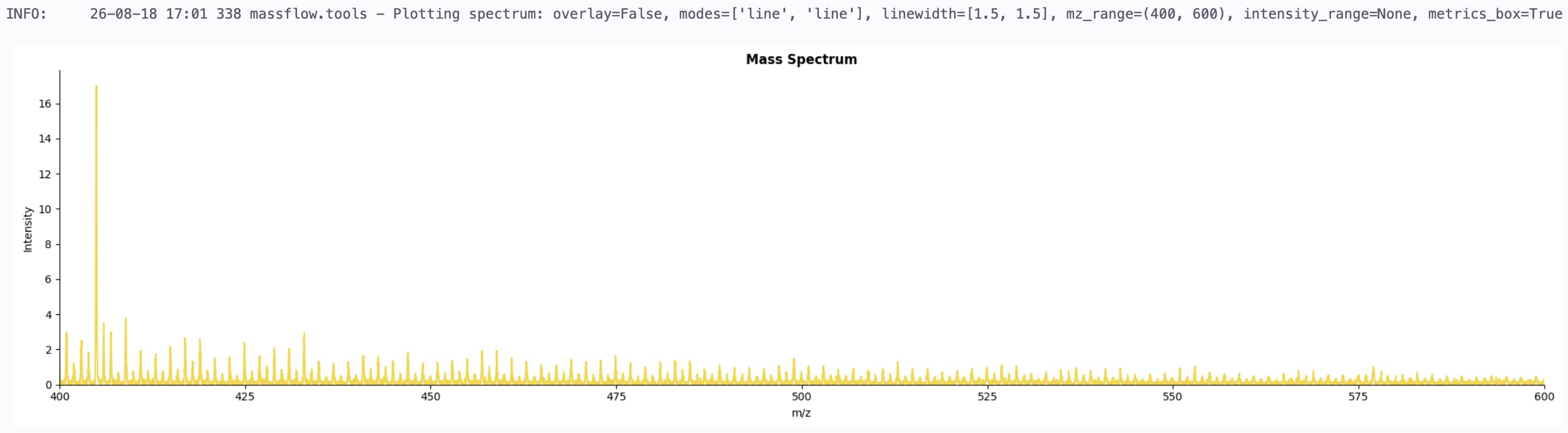
其中:
dm.ms[1]表示选择其中一个像素位置对应的质谱。
mz_range=(400, 600)表示只显示 m/z 400–600 的范围,可以根据自己的数据修改。
如果数据是轮廓型(profile),谱图通常显示为轮廓图;如果数据是质心型(centroid),则主要用棒状图显示离子峰的位置和对应强度。
查看原始质谱时,可以先关注:
- 是否存在明显的基线抬高或缓慢漂移;
- 连续质谱中是否存在较多快速的小幅波动;
- 主要离子峰大致位于哪些 m/z 范围。
这里选择的只是一条质谱,不能代表整份 MSI 数据。实际分析时,应根据组织位置查看多个像素。
更多绘图方式,例如设置显示范围、绘制轮廓谱和质心谱以及比较处理前后的质谱,可查看:谱图可视化
5. 查看 TIC 图
除了查看单个像素的质谱,还可以通过 TIC 图观察整份 MSI 数据的整体空间情况。
TIC(Total Ion Current)表示每个像素位置上一条质谱中所有信号强度的总和。把每个像素的 TIC 放回原来的空间位置后,就可以得到一张二维 TIC 图。
先导入绘图工具:
from massflow.tools.plot_ion_image import plot_tic_image然后运行:
plot_tic_image(
    dm,
    output_path="tic_image.png",
    save_image=True,
    show=True,
)
TIC 图可以帮助查看:
- 组织的大致轮廓;
- 空白区域;
- 异常强信号区域;
- 是否存在明显的扫描缺口。
TIC 图主要用于观察数据的整体空间情况,不能单独用来判断具体离子的生物学意义。
如果需要查看某一个目标 m/z 在组织中的空间分布,可以进一步绘制离子图。具体方法见:离子图读取与绘制
下一步
完成数据读取、数据基本信息检查、原始质谱和 TIC 图查看后,再根据当前数据的实际情况选择后续处理方法。
MassFlow 提供的常用处理包括:
| 处理步骤 | 主要作用 |
|---|---|
| 基线校正 | 当质谱存在明显基线抬高或缓慢漂移时进行校正 |
| 噪声抑制 | 减少轮廓谱中的快速小幅波动 |
| 强度归一化 | 减小不同像素之间整体信号强弱造成的差异 |
| 峰提取 | 从轮廓型数据中识别主要离子峰 |
| 同位素峰过滤 | 按需要减少后续同位素峰 |
| 峰对齐 | 将不同像素中位置接近的峰匹配到共享 m/z 轴 |
| 统计峰过滤 | 根据峰的出现情况和强度进一步筛选 |
| 加合物过滤 | 识别并筛选可能来自同一化合物的不同加合离子 |
第一次处理新的 MSI 数据时,不建议读取数据后立即运行完整预处理流程。
建议先查看原始数据,再在 Jupyter Notebook 中分阶段进行处理,每完成一步先检查结果,再决定是否修改参数或继续下一步。
完整处理示例见:最佳实践